Aster
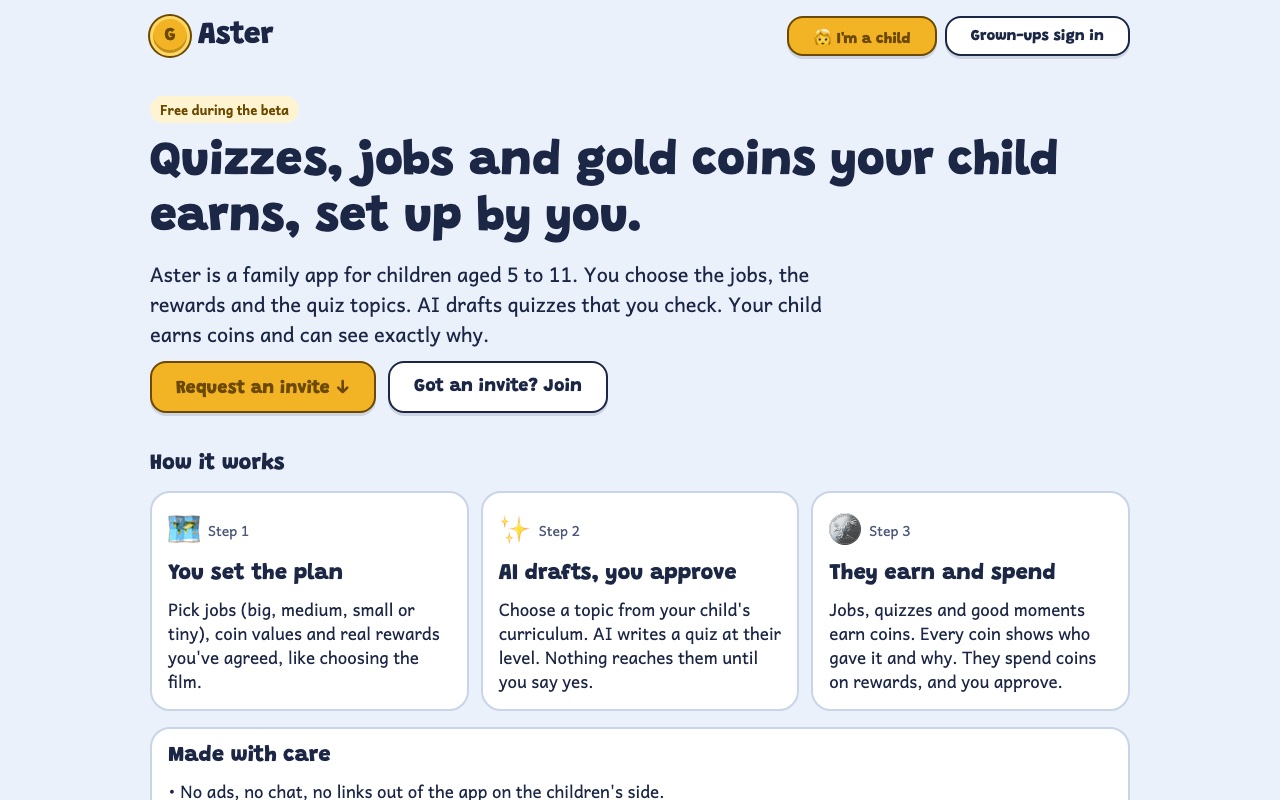
Quizzes, jobs and gold coins your child earns, set up by you.
asterkids.app ↗- WHAT
- A family app for children aged 5 to 11. Parents set the jobs, rewards and quiz topics. AI drafts quizzes that parents check. The child earns gold coins and can see why each one moved.
- MY ROLE
- I built it on my own, from the problem to the launch, with Claude Code doing the coding and me guiding it.
- TIMELINE
- First commit on 2 November. My family started using it on 9 November. The beta opened on 12 November. About 46 commits in 11 days.
- STATUS
- Free, invite-only beta. My family uses it every day. Anyone can request an invite.
Background
I wanted a way to follow my daughter's all-round development, school learning, habits, kindness and hobbies, without nagging her. I also wanted something the whole family does together.
Nothing I tried did both. Sticker charts and chore apps don't connect to learning. Learning apps don't connect to home life, and many put AI or ads in front of children.
My 7-year-old wants to do the right thing, so a coin system with written rules suits her. She knows what earns what. Small things pay straight away, big things wait for a parent, and every coin has a reason and a name attached. Quizzes are one way to earn coins, and they're where most of the learning happens.
Principles
- Parents write the list. Every way to earn, lose or spend coins is on it.
- Every coin has a reason. What, how many, why, who and when. History is never edited. A mistake is fixed with a visible reversing entry.
- Small things are trusted, big things are checked. Tiny and small jobs pay instantly. Medium and big jobs wait for a parent.
- Taking coins back is calm. Always with a reason, never below zero, and never from coins saved for a reward.
- A 7-year-old can use it alone. Big buttons, short words, one main action per screen.
How I used AI
One rule came first: AI works for the parent, never directly with the child. It drafts quizzes from the child's curriculum and school year. Nothing reaches the child until a parent approves it, and the child's name is never sent to the AI.
- APPROVAL IS MORE THAN A BUTTONEvery AI quiz stays a draft until a parent approves it. The database enforces this, not just the screen.
- TRUST IS EARNEDA repeating quiz can go live on its own only after a parent has approved 5 in a row without edits. Each one still has to pass automatic checks, and parents get an email first.
- THE MODEL GETS THE MINIMUMTopic, school year, curriculum and which questions the child found hard. Names are stripped, even from notes a parent types.
- I PICKED THE MODEL BY TESTING ITI gave four models the same request. DeepSeek V4.1 Flash was the only one whose quiz a parent could approve without edits. It was also the fastest, at 14 seconds, and costs about $0.0026 a quiz. That's roughly 3 cents a week for a family. A free model is the fallback.
- THE FIRST EVAL SCORE WAS WRONGI ran 30 topics × 2 levels × 8 questions through 12 rule-based checks, which cost nothing to run. The first score said 30% passed. When I read the failures, the checker was wrong, not the AI. Once I fixed it, the score was 90% (54 of 60). The eval also found a real bug: questions about apostrophes (dog's vs dogs') were being rejected as duplicates.
- ONE PLACE FOR EVERY AI CALLEach call logs the model, prompt version, tokens, cost and time, so comparing models is a query. The model is a setting, never hard-coded.
- LIMITS KEEP A FREE BETA AFFORDABLE5 AI quizzes per family per day, 3 repeating series, and a monthly budget that pauses AI and alerts me.
What real use taught me
My 7-year-old started using Aster on 9 November. On day one she earned 11 coins for three things we asked. Watching her use it changed my plans quickly:
- Finished quizzes cluttered her shelf, and one quiz paid out twice on two different days. Now each quiz pays once, finished ones fold away, and new ones get a NEW ribbon.
- She couldn't go back to a question. Now she can, with back and next buttons, numbered dots and an optional page to check her answers.
- The second parent in our house found the grown-ups' screen hard to read. What does ✅ mean? What about 🧠? Now there's a legend, small tooltips and a simpler settings menu.
- Every bug someone hits gets a failing test first, then the fix.
Three days after her first go, I opened it to other families as an invite-only beta, with family setup, a privacy notice, limits and a waitlist.
What I'd tell another PM
- Put the rules that protect users in the database, not only on the screen.
- Read the failures before you trust an eval score. Mine was wrong because the checker was wrong.
- Watch your first user. She found problems my tests didn't.
How it's built
- Expo (React Native)
- TypeScript
- Vercel
- Supabase
- OpenRouter
- Resend
Families are kept apart in the database. Children can only read approved content and can't give themselves coins: every coin goes through a server function that applies the rules and records who did it. The same code can become an iOS app later.
Code available on request.
What's next
Next I'm opening it to 5 to 10 families, then batches of about 20 from the waitlist. The number I'm watching is how many children still use it in their third week. I'm aiming for 40%.
After about 8 weeks with 20+ families, I'll decide whether to charge. The obvious paid feature is quizzes on autopilot.
If you'd like to try it with your family, you can request an invite at asterkids.app.
Curriculum topics come from the Marble Skill Taxonomy © Generative Spark, Inc. (withmarble.com), under ODbL 1.0 and CC BY-SA 4.0.